
Review and approval for AI catalog decisions.
In Youzu, enrichment can be reviewed before it is accepted, and a review queue lists flagged products by status, severity and rule. You define the rules and reviewers decide; active rules never change automatically.
Key points
- Review enrichment before it is accepted: approve or reject each suggestion.
- Review moderation findings in a queue by status, severity and rule.
- Use a false positive to draft a rule refinement that you review and activate.
- Keep your rules in charge: active rules never change automatically.
Try it
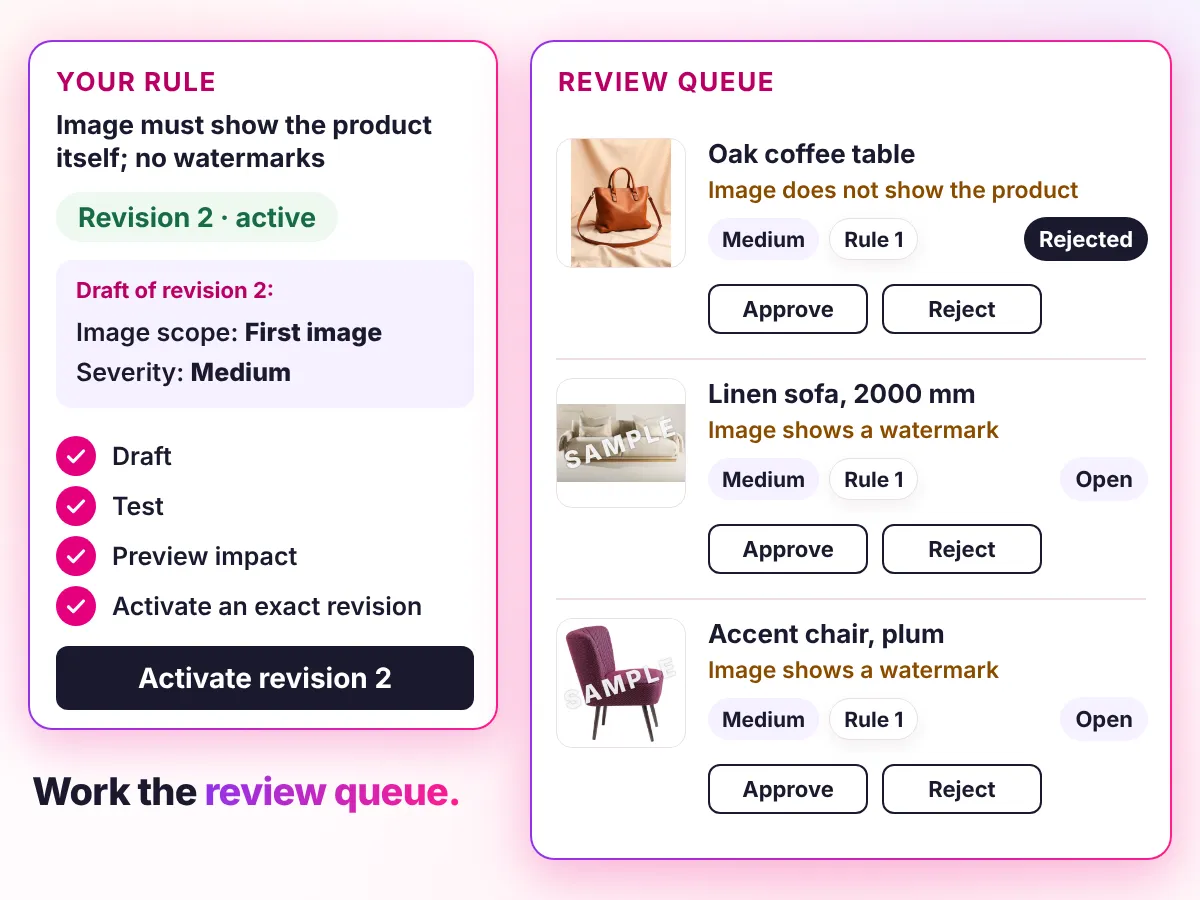
Work the review queue.
Reviewers can approve or reject enrichment before it is accepted. Youzu keeps the seller's original record beside the enriched result so changes can be reviewed.
Preview a rule, then decide what happens to each flagged listing.
Rule 1: Image must show the product itself; no watermarks
- Severity
- Low
- Image scope
- None
Reference images: None
Revision 1 is active.
Rule 2: No contact details in the title or description
- Severity
- Low
- Text scope
- None
Revision 1 is active.
Rule impact preview
Rule 1: Image must show the product itself; no watermarks
6 listings in this example. Preview shows which ones this revision would flag.
 Image 1Image 2Listing 1Terracotta armchair, wooden legs
 Image 1Image 2Listing 2Linen sofa, 2000 mm
 Image 1
 Image 2Listing 3Oak coffee table
 Image 1Image 2Listing 4Oak side table
 Image 1Image 2Listing 5Accent chair, plum
 Image 1
 Image 2Listing 6Velvet sofa, navy. Contact me directly
Decisions
How a decision is made
- Inputs
- Suggestions from enrichment and findings from moderation rules, each with the evidence or rule behind it.
- Signals
- For a finding, the rule and severity that raised it; for a suggestion, the text or image evidence it rests on.
- Review
- You decide what a person checks. Reviewers can approve or reject enrichment before it is accepted; flagged products wait in the review queue.
- Output
- Prepared records and moderation state are available through the API; delivery to a destination is scoped per integration.
- Original record
- Youzu keeps the seller's original record beside the enriched result so changes can be reviewed. The queue lists findings by status, severity and rule.
Your rules, your reviewers, your approval.
What Rule 1 flags and the review queue it fills
Image scope: First image. This revision would flag 3 of 6 listings.
Flagged
- Listing 2: Linen sofa, 2000 mm
- Listing 3: Oak coffee table
- Listing 5: Accent chair, plum
Not flagged
- Listing 1: Terracotta armchair, wooden legs
- Listing 4: Oak side table
- Listing 6: Velvet sofa, navy. Contact me directly
| Listing | Finding | Severity | Rule |
|---|---|---|---|
| Linen sofa, 2000 mm | Image shows a watermark | Medium | Rule 1 |
| Oak coffee table | Image does not show the product | Medium | Rule 1 |
| Accent chair, plum | Image shows a watermark | Medium | Rule 1 |
Documentation
Questions buyers ask
It means a person can approve or reject enrichment before it is accepted, and moderation findings wait in a review queue for a decision. You define the rules and reviewers decide. Youzu keeps the seller's original record beside the suggestion so the reviewer sees the original and the proposed change. Work the queue in the example above.
Reviewers can approve or reject enrichment before it is accepted, and flagged moderation products wait in a review queue. Which suggestions a person checks is agreed with you instead of assumed, so bring the approval rules your team already uses. Describe your reviewers and your current approval steps when you book a demo.
The review queue lists flagged products by status, severity and rule. A reviewer approves or rejects each finding; approving can republish an offer that moderation held and rejecting can unpublish it. Marking a false positive creates a draft rule refinement that you review and activate. The content moderation page covers how rules are written and previewed.
No. Active rules never change automatically. False-positive feedback can generate a draft refinement, and a person on your team reviews and activates it. That keeps the policy under your control, so any change to what gets flagged is one your team approved. Mark a false positive in the example to see the draft refinement; the active rule stays as it was.
Prepared records are available through the API, with filters for processing status and moderation state. Delivery of approved records to your PIM, storefront or marketplace is scoped per integration, and Youzu does not send them automatically. Your systems stay authoritative for their own data. The integrations page lists what is available today.
Next step
Discuss your catalog.
Bring one workflow and the approval rules your team already uses.