Discover

Shop the Look: make inspiration images shoppable.

Youzu's Shop the Look detects several items in a photo and lets shoppers match each one to products in your assortment. An editorial or inspiration image can lead to the products in it.

Key points

  • Check several items in one photo, each on its own.
  • Match each item to products in your assortment.
  • Use the look as the entry: a shopper picks a piece, then returns for another.
  • Keep matches visual: similar items, not a styling recommendation.

Try it

Choose a piece from the look.

Select an item in the scene or in the list, then return to the look.

A fashion look: a person in a beige trench coat over a denim shirt and blue jeans, with white sneakers and a cream tote bag, on a plain light background.

Items in the look

Trench coat

Similar items
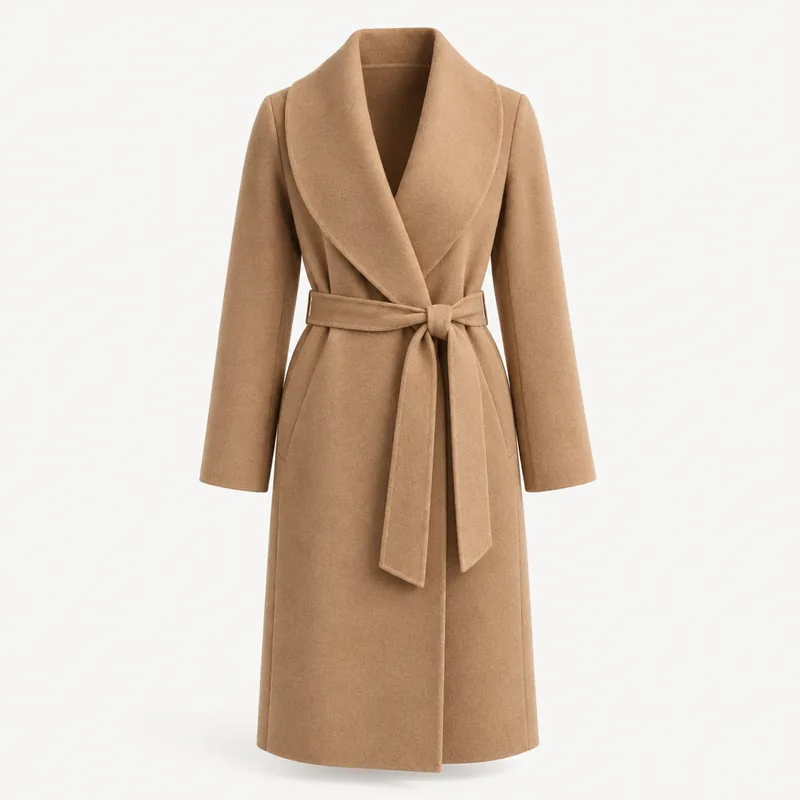
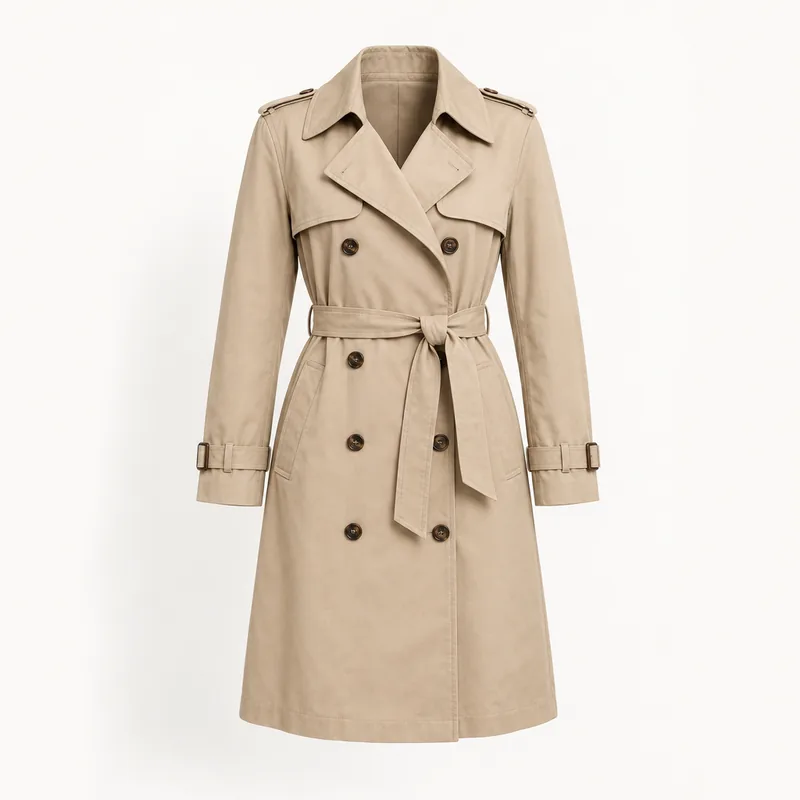
  • A knee-length beige trench coat with a tie belt.

    Beige trench coat

    Similar

    Trench coat · Beige

  • A belted camel wrap coat with a shawl collar.

    Belted camel coat

    Broad

    Coat · Camel · Belted

Read as text
  1. Select an item in the scene or in the list, then return to the look. The scene has 5 detected items; 3 markers show first: trench coat, tote bag and sneakers.
  2. Trench coat: Beige trench coat (Similar); Belted camel coat (Broad).
  3. Denim shirt: No match in this assortment. The other items stay available.
  4. Jeans: Straight blue jeans (Similar).
  5. Sneakers: White leather sneakers (Similar); Canvas sneakers, white (Broad).
  6. Tote bag: Leather tote, tan (Exact); Structured tote, cream (Similar).
  7. Shop this look opens a list of every item: 5 items detected · 4 with matches. Back to the look returns to the scene with the item still highlighted.
See it with your products

Decisions

How a decision is made

Inputs
An editorial or inspiration photo and your product assortment.
Signals
Items detected in the photo, each matched to products by visual similarity; each match carries a label of exact, similar or broad.
Match labels
No review step: matches are shown to the shopper. An item with no useful match shows an empty state in the example; your integration defines the real case.
Your catalog
Shop the Look returns products per item; what happens after a shopper picks one belongs to your storefront.
Uploaded images
Ask us how uploaded images are retained and deleted.

The example's first state: every item detected in the look and its matches.

The example's first state: every item detected in the look and its matches.
Detected itemMatchesMatch label
Trench coatBeige trench coatSimilar
Belted camel coatBroad
Denim shirtNo match in this assortmentNone
JeansStraight blue jeansSimilar
SneakersWhite leather sneakersSimilar
Canvas sneakers, whiteBroad
Tote bagLeather tote, tanExact
Structured tote, creamSimilar

Try it

Shop the whole look

Open each item in the look, then use Move to look to choose the product from your assortment that matches it.

A flat-lay outfit: a cream ribbed turtleneck, brown corduroy wide-leg trousers, black leather Chelsea boots and a cognac leather bucket bag.
Items in the look

Open an item to see its candidates.

Your look

  1. SweaterNot matched yet
  2. TrousersNot matched yet
  3. BootsNot matched yet
  4. BagNot matched yet

Your assortment

  • Chocolate-brown corduroy straight-leg trousers laid flat.Brown cord straight-leg trousers
  • A cognac leather drawstring bucket bag.Cognac leather bucket bag
  • An oatmeal cable-knit crew-neck sweater laid flat.Oatmeal cable-knit sweater
  • A pair of black leather Chelsea boots.Black leather Chelsea boots
  • Chocolate-brown corduroy wide-leg trousers laid flat.Brown cord wide-leg trousers
  • A black leather drawstring bucket bag.Black leather bucket bag
  • A cream ribbed turtleneck sweater laid flat.Cream ribbed turtleneck
  • A pair of dark brown suede Chelsea boots.Brown suede Chelsea boots
Read as text

The photo shows one look with 4 items: 1 Sweater, 2 Trousers, 3 Boots, 4 Bag. The assortment has 8 products. Open an item, then use Move to look to choose its product.

  • Sweater: suggested product Cream ribbed turtleneck. Also a candidate: Oatmeal cable-knit sweater (different from the suggestion: The look's sweater is a ribbed turtleneck; this one has a crew neck.).
  • Trousers: suggested product Brown cord wide-leg trousers. Also a candidate: Brown cord straight-leg trousers (both are valid: The same brown corduroy; only the leg is narrower.).
  • Boots: suggested product Black leather Chelsea boots. Also a candidate: Brown suede Chelsea boots (different from the suggestion: The same Chelsea shape, but in brown suede instead of black leather.).
  • Bag: suggested product Cognac leather bucket bag. Also a candidate: Black leather bucket bag (different from the suggestion: The same bucket shape, but black instead of cognac.).

Shop the Look detects several items in a photo and lets shoppers match each one to products in your assortment.

See it with your products

See it in the product

Explore the products within a look.

Shop the Look turns one photo of an outfit into products from your catalog.

Questions buyers ask

Shop the Look detects several items in a photo and lets shoppers match each one to products in your assortment. An editorial, lookbook or inspiration image can then lead to the products in it, one item at a time, while the shopper stays in the scene. Choose a piece in the example above to see it.

In the example, that item shows an empty state and the other items stay available. Shop the Look matches detected items to your assortment, so an item you do not stock has nothing to match. How your storefront presents that case is defined in your integration. Bring a lookbook image to a demo to test it.

No. A match means the product looks like the item in the photo, not that it suits the rest of the outfit or room. Youzu does not claim compatibility between items. Matches carry a label of exact, similar or broad so shoppers can tell how close each result is. The Youzu Lens page explains the labels.

Product images. Matching works from your catalog's own product images, so the products you want shoppers to reach need usable images, and the assortment decides what can match. Supported categories are scoped with you. Bring a sample of your assortment and the photos you want to make shoppable.

Next step

See it with your products.

Bring a lookbook image and the products in it.