
Automate product operations, review the exceptions.
Youzu ingestion is asynchronous: an accepted request does not mean processing has finished, and each product shows its processing status. Send products as JSON in a request, a hosted CSV, JSON or XML file, or a dashboard upload; review the exceptions; and read processed products back through the API. Changed products can be re-sent at any time.
Key points
- Send products as JSON, a hosted CSV, JSON or XML file, or a dashboard upload.
- Check each product's processing status; accepted is not finished.
- Review exceptions instead of re-keying every record.
- Use the API to read processed products, variants, offers and moderation state back.
- Send changed products again at any time.
Try it
Build your pipeline.
Add the steps you would want, then watch one record move through them.
Steps you can add
Enrichment
Fill the attributes your category defines and leave a field empty when the evidence does not support it.
Auto-categorization
Map each product to your category tree.
Titles and descriptions
Draft titles and descriptions from the attributes available at that step.
Variants and families
Keep colors and sizes together as variants of one product.
Duplicate detection
Keep listings separate unless they can be shown to be the same product.
Offer matching
Attach each seller's offer to one product.
Content moderation
Run the rules you define and flag what needs a closer look.
Human review
Let a person approve or reject enrichment before it is accepted.
Your pipeline
Intake
Products arrive as JSON, a hosted CSV, JSON or XML file, or a dashboard upload.
Step 1: Empty
Step 2: Empty
Step 3: Empty
Step 4: Empty
Step 5: Empty
Step 6: Empty
Read back
Processed products can be read back through the API with filters.
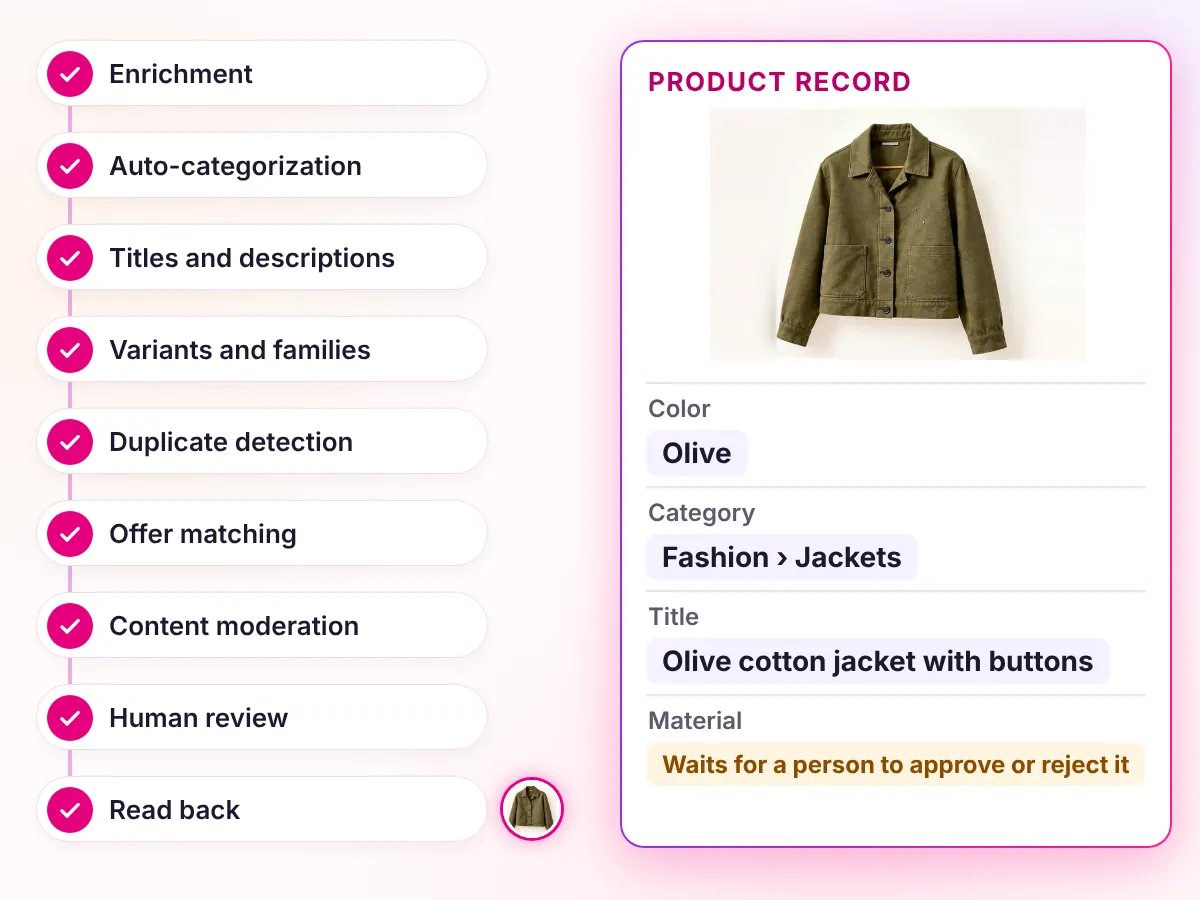
One product record
As the seller sent it
- Title
- jkt olive
- Color
- OLV
- Material
- Empty
- Category
- Empty
- Variants
- 9 loose rows
- Second listing
- Seller B listing, not decided
After your steps
Add a step to see what happens to the record.
What to know
Source updates
When the source catches up.
Step through one record: a field the source left empty, then the next update.
Desk lamp
Lighting › Desk lamps · LMP-DESK-BLK
- Material
- metal
- Colour
- black
- Shade
- fabric
- Switch
- on the cable
- Dimmable
- yes
- Shade colour
- whiteWaiting for your review
Processing status: processed
4 steps
Youzu extracts the attributes your category defines; values the evidence does not support are left empty.
Changed products can be re-sent at any time; the same SKU identifies a later version of an offer.
Ingestion is asynchronous: an accepted request does not mean enrichment, indexing or deduplication has finished, and each product shows its processing status.
Enrichment can be reviewed before it is accepted.
Read as text
Decisions
How a decision is made
- Inputs
- Products as JSON in a request (up to 5 MiB per request), as a hosted CSV, JSON or XML file URL, or as a dashboard upload.
- Signals
- Each product's processing status and, per your setup, enrichment, categorization, moderation and matching results.
- Review
- Exceptions wait for a reviewer: a moderation finding, an unresolved category, or a fact the evidence does not support.
- Output
- Poll status and read processed products, variants, offers and moderation state through the API with filters. Delivery to a destination is scoped per integration.
- Original record
- Each product shows its processing status. Youzu keeps the seller's original record beside the enriched result so changes can be reviewed.
Your rules, your reviewers, your approval.
Before you start: 8 steps you can add and 6 empty slots
Steps you can add
- Enrichment: Fill the attributes your category defines and leave a field empty when the evidence does not support it.
- Auto-categorization: Map each product to your category tree.
- Titles and descriptions: Draft titles and descriptions from the attributes available at that step.
- Variants and families: Keep colors and sizes together as variants of one product.
- Duplicate detection: Keep listings separate unless they can be shown to be the same product.
- Offer matching: Attach each seller's offer to one product.
- Content moderation: Run the rules you define and flag what needs a closer look.
- Human review: Let a person approve or reject enrichment before it is accepted.
Your pipeline
- Intake: Products arrive as JSON, a hosted CSV, JSON or XML file, or a dashboard upload.
- Step 1: Empty
- Step 2: Empty
- Step 3: Empty
- Step 4: Empty
- Step 5: Empty
- Step 6: Empty
- Read back: Processed products can be read back through the API with filters.
Questions buyers ask
It is a pipeline that replaces re-keying. You send products as JSON, a hosted file or a dashboard upload, Youzu processes them against your rules, each product shows its status, and your team reviews the exceptions. Processed products, variants, offers and moderation state can be read back through the API. Build one in the example above.
3 ways: JSON in a request (up to 5 MiB per request), a hosted CSV, JSON or XML file URL, or a manual upload in the dashboard. You do not need a pre-built connector, so you can start by sending files or calling the API, and changed products can be re-sent at any time. Send a sample file to begin.
Ingestion is asynchronous, so an accepted request does not mean enrichment, indexing or matching has finished. Each product shows its processing status, and you poll that status through the API. Youzu states no standard timeline: the timeline is sized with you after Youzu has seen a sample. Bring a sample to a demo.
Re-send it. The same SKU identifies a later version of an offer, and changed products can be re-sent at any time. Your system decides when to send an updated product, and the new version is processed and shown with its own processing status like any other. The Send products as JSON documentation describes a re-send.
Yes, through the API. Processed products, variants, offers, moderation state and processing status can be read back with filters. Delivery of results into a destination system is scoped per integration, so engineering time is part of the plan. Your PIM and storefront stay authoritative for their own data. See the integrations page for patterns.