
Listing moderation for marketplaces and classifieds.
With Youzu, you define moderation rules as versioned rulesets with severity levels, image scope and reference images, then activate an exact revision. Listing moderation applies those rules to seller listings, covering text and images, and flagged products wait in a review queue.
Key points
- Use versioned rulesets with severity, image scope and reference images.
- Check a rule, preview which products an activation affects, then activate an exact revision.
- Review flagged products in a queue by status, severity and rule.
- Keep active rules unchanged until you review and activate a draft refinement.
Try it
Preview a rule, then decide what happens to each flagged listing.
Preview a rule, then decide what happens to each flagged listing.
Rule 1: Image must show the product itself; no watermarks
- Severity
- Low
- Image scope
- None
Reference images: None
Revision 1 is active.
Rule 2: No contact details in the title or description
- Severity
- Low
- Text scope
- None
Revision 1 is active.
Rule impact preview
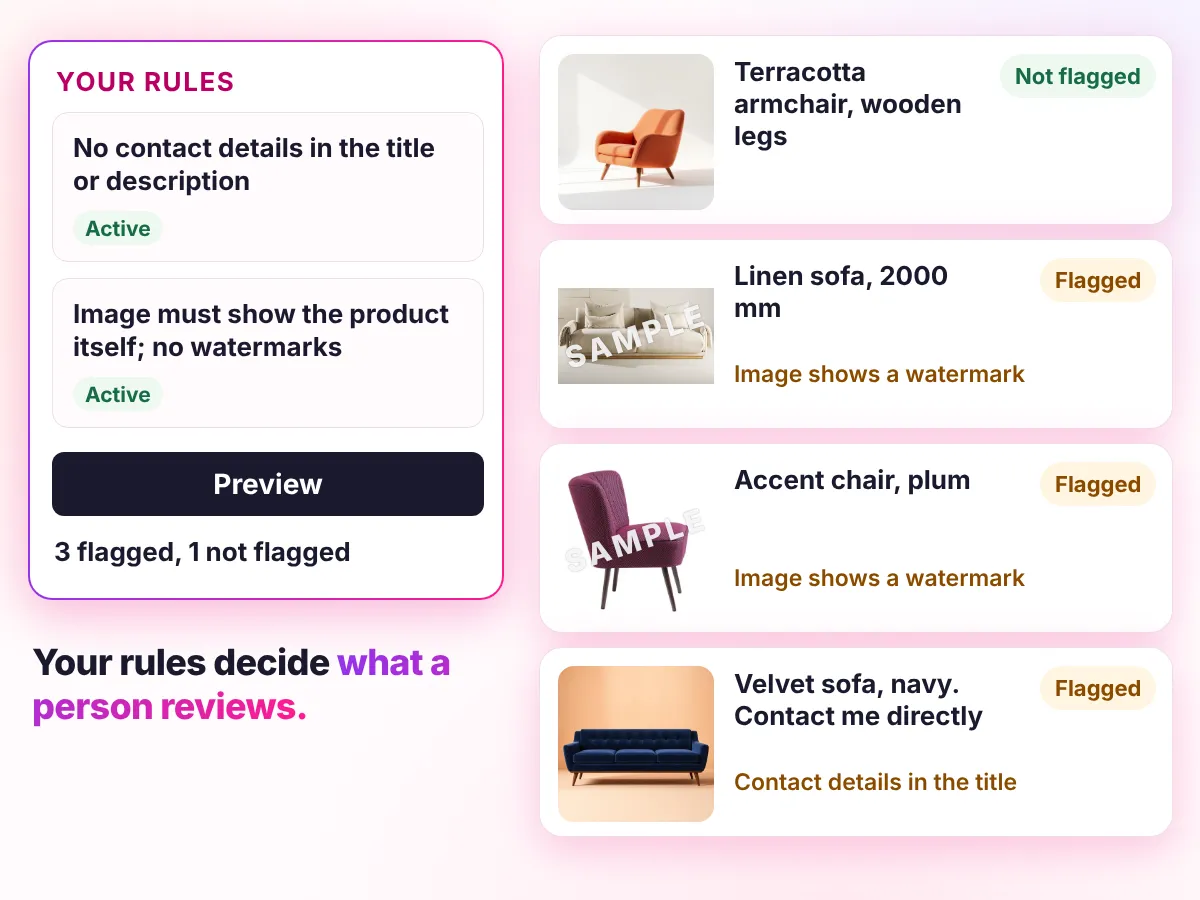
In developmentRule 1: Image must show the product itself; no watermarks
6 listings in this example. Preview shows which ones this revision would flag.
 Image 1Image 2Listing 1Terracotta armchair, wooden legs
 Image 1Image 2Listing 2Linen sofa, 2000 mm
 Image 1
 Image 2Listing 3Oak coffee table
 Image 1Image 2Listing 4Oak side table
 Image 1Image 2Listing 5Accent chair, plum
 Image 1
 Image 2Listing 6Velvet sofa, navy. Contact me directly
- 1Draft
- 2TestIn development
- 3Preview impactIn development
- 4Activate an exact revision
Decisions
How a decision is made
- Inputs
- Listing text and images, and the rulesets you define with severity, image scope and reference images.
- Signals
- Each active rule evaluated against the listing's text and the images in scope; a finding names the rule that raised it.
- Review
- Preview which products an activation would affect before you activate an exact revision. Flagged products wait in a review queue by status, severity and rule.
- Output
- Approving a finding can republish an offer that moderation held; rejecting it can unpublish the offer. Moderation state is available through the API.
- Original record
- Youzu keeps the seller's original record beside the enriched result so changes can be reviewed. A false positive can create a draft refinement; active rules never change automatically.
Your rules, your reviewers, your approval.
What Rule 1 flags and the review queue it fills
Image scope: First image. This revision would flag 3 of 6 listings.
Flagged
- Listing 2: Linen sofa, 2000 mm
- Listing 3: Oak coffee table
- Listing 5: Accent chair, plum
Not flagged
- Listing 1: Terracotta armchair, wooden legs
- Listing 4: Oak side table
- Listing 6: Velvet sofa, navy. Contact me directly
| Listing | Finding | Severity | Rule |
|---|---|---|---|
| Linen sofa, 2000 mm | Image shows a watermark | Medium | Rule 1 |
| Oak coffee table | Image does not show the product | Medium | Rule 1 |
| Accent chair, plum | Image shows a watermark | Medium | Rule 1 |
Documentation
Questions buyers ask
Listing moderation checks seller listings against the rules you define. Youzu applies versioned rulesets with severity, image scope and reference images to text and images, and sends flagged products to a review queue where a person approves or rejects each finding. You define the rules; Youzu applies them and routes exceptions. Try the example above.
Yes. You define the rules, test them, preview which products an activation would affect and activate an exact revision. A ruleset can also be saved as a template and chosen when you create a catalog. The policy is yours; Youzu does not decide what your marketplace allows. Bring one policy to a demo to see it applied.
It waits in a review queue listed by status, severity and rule. A reviewer approves or rejects the finding. Approving a finding can republish an offer that moderation held, and rejecting it can unpublish the offer. What happens in other sales channels follows your integration. The review and governance page shows the queue.
Not automatically. Marking a finding as a false positive can generate a draft rule refinement, which you review and activate. Active rules never change on their own, so your team approves every change to the policy before it affects a listing. The review and governance page shows how the draft refinement is handled.
No. You define the rules; Youzu applies them and routes exceptions to your reviewers. It is not a compliance certification and makes no blanket promise about regulation. Your legal obligations remain with your marketplace and its counsel, who should decide what the rules need to cover. Ask for a demo on your own policy.
It depends on your integration. Merchant image checks are advisory: they return findings with a severity and reasons, and your application decides whether to warn, ask for a replacement or hold the listing. In a catalog workflow, findings are handled in the review queue. Youzu tests the flow on your listing process.