
Guide Catalog operations
Product, variant, family and offer: a data model for marketplaces.
A variant is one purchasable version of a product, such as a size or color; an offer is one seller's listing of it at a price. A product family groups related products, and keeping them separate, as this Youzu guide explains, lets filters, availability and comparison work across sellers.
Published by Youzu · Editorial policy
- Published
- Reading time
- 9 min read
Key points
- Keep family, product, variant and offer as 4 separate records with their own fields.
- Group options of one product, such as color and size, as variants under that product.
- Keep each seller's price, stock, condition and delivery on the offer, never on the product.
- Check whether a difference creates a new product or a variant before grouping anything.
- Use one written rule per category for bundles and pack sizes.
In this guide
4 terms, one data model
Most catalog problems that look like search or pricing problems start in the data model. 4 terms carry it, and teams use them loosely, so it is worth fixing their meaning before anything else.
- A product family groups everything that shares one model or brand identity: every color and size of one jacket model, or a sofa range in 2 widths.
- A product is the thing a shopper recognizes and a product page describes: the jacket, the terracotta armchair.
- A product variant is one purchasable version of that product, set by its values on defined axes such as color, size or pack size.
- A marketplace offer is one seller's terms for selling a product or variant: price, stock, condition and delivery.
Diagram
Family, product, variant and offer
Public standards follow the same split. Google Merchant Center groups variants with an item group ID, keeping the group identifier the same while each variant keeps its own values for attributes such as color, size, material and pattern.[1] Schema.org models a ProductGroup with variants that differ in named ways, and an Offer as a separate thing that carries price, availability, condition and seller.[2][3]
In many catalogs the family and the product are the same record, and that is fine. The distinction matters when one family holds several products, such as a sofa range with a 2-seat and a 3-seat model, each with its own color options.
Worked example: one jacket in 3 colors and 3 sizes
9 listings arrive for one jacket. Their titles disagree in spelling, word order and abbreviation: 'jkt olive s', 'Jacket Olive M', 'olive jkt - L'. Read for their axes, they carry the same 2 facts in different forms: a color and a size. Grouped on those axes, they become one product with 9 variants in a 3-by-3 matrix.
Worked example
One jacket in 3 colors and 3 sizes
| Listing as received | Color | Size | Decision |
|---|---|---|---|
| jkt olive s | Olive | S | Variant of Jacket |
| Jacket Olive M | Olive | M | Variant of Jacket |
| olive jkt - L | Olive | L | Variant of Jacket |
| jkt sand S | Sand | S | Variant of Jacket |
| SAND jacket m | Sand | M | Variant of Jacket |
| jacket (sand) L | Sand | L | Variant of Jacket |
| jkt blk s | Black | S | Variant of Jacket |
| Black Jacket M | Black | M | Variant of Jacket |
| jkt black L | Black | L | Variant of Jacket |
| Parka, olive, M | Olive | M | Different productParka, olive, M is a different product. It stays separate. |
Jacket: colors and sizes
| Color | S | M | L |
|---|---|---|---|
| Olive | Olive, S | Olive, M | Olive, L |
| Sand | Sand, S | Sand, M | Sand, L |
| Black | Black, S | Black, M | Black, L |
A tenth listing sits next to them: an olive parka in size M. It shares a color and a size with one of the jackets, but it is a different product type, so it stays separate rather than becoming a tenth variant. Grouping on axes only works once the product itself is the same.
What is a variant and what is a different product
The test is simple to say and hard to apply: a variant differs only on the axes your category defines; anything else makes it a different product. Write the axes down per category so sellers and reviewers apply them the same way.
| Difference | Example | Decision |
|---|---|---|
| Color | Olive jacket and sand jacket of the same model | Variant |
| Size | Jacket in S and in L | Variant |
| Product type | Olive jacket and olive parka | Different product |
| Model | Navy velvet sofa and grey 2-seat sofa | Different product |
| Width outside the defined options | Terracotta armchair 640 mm and 780 mm wide | Different product |
| Seats within a range | Navy velvet sofa as 3-seat and 2-seat | Variant of the same family, by your rule |
The last 2 rows show why the rule must be written per category. In one catalog, seat count is a variant axis of a sofa range; in another, each seat count is its own product. Either works. What breaks a catalog is applying both rules to different sellers.
Bundles and packs
Bundles and multipacks are the most common source of disagreement. A sofa sold with a matching armchair, or a pack of 6 bottles next to a single bottle, can be modeled in 2 ways:
- As a variant axis. Pack size becomes an option of one product. This keeps reviews and content together and suits catalogs where shoppers compare pack sizes on one page.
- As separate products. Each pack or bundle is its own product with its own identifier. This suits catalogs where packs are bought by different buyers or carry different identifiers from the brand.
Identifiers usually settle the question: when the brand gives the pack its own GTIN (a globally unique product identifier of 8, 12, 13 or 14 digits issued under GS1 standards and printed as a barcode), it is a separate trade item. Whichever model you choose, apply it per category for every seller, and never mix single items and packs as offers on one product.
Offers: seller, price, stock, condition
On a marketplace, several sellers list the same product. Each listing that matches becomes an offer on the shared product. The product keeps the facts that are true for every seller, such as model, color and width. Each offer keeps the facts that belong to one seller: price, stock, condition and delivery.
In the example below, three sellers list the same terracotta armchair. One offer is used, with a small scuff on one arm, and available for pickup only. That condition stays on that seller's offer, and the product record does not change. A fourth listing looks the same but is 780 mm wide instead of 640 mm, so it is a different product, not a fourth offer.
Worked example
One armchair, 3 offers
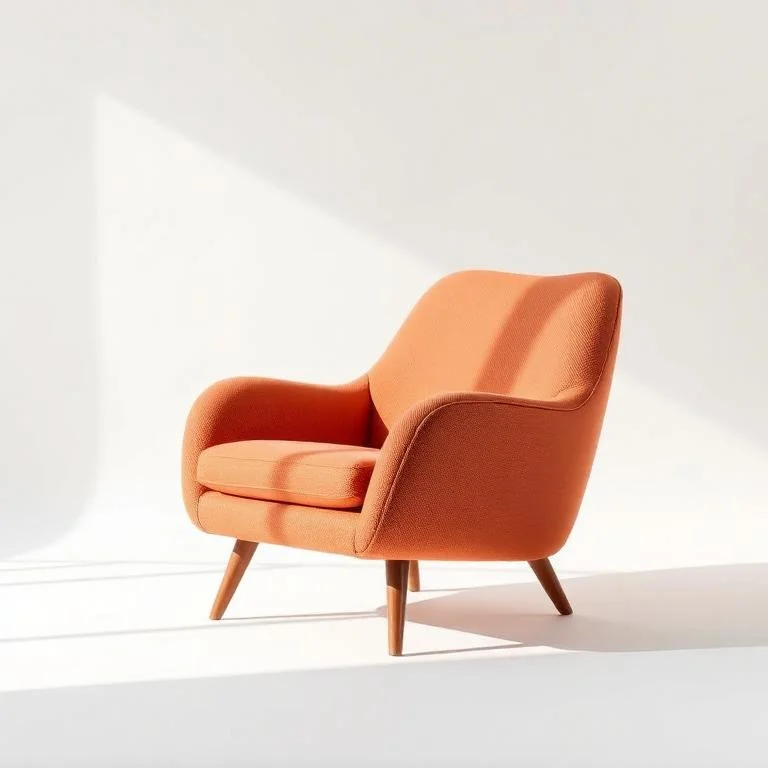
Product
Armchair, terracotta, wooden legs
- Model
- Armchair AC
- Color
- Terracotta
- Width
- 640 mm
| Seller | Listing title | Condition | Delivery |
|---|---|---|---|
| Seller A | Terracotta armchair, wooden legs | New | Standard |
| Seller B | Armchair terracotta wood legs, small scuff on one arm | Used | Pickup only |
| Seller C | Armchair, terracotta | New | Standard |
Seller D's listing is a different size. It stays a separate product. Width 780 mm against 640 mm.
Offers carry their own identifiers too. A seller's stock-keeping code identifies that seller's offer, not the product, which is why it never belongs in the product's GTIN field. When a seller re-sends a changed offer with the same code, it should update that offer rather than create another one.
Common modeling mistakes
- Variants as products. 9 listings of one jacket stay as 9 products. Search shows the same jacket 9 times, and reviews split 9 ways.
- Products as variants. A parka is grouped under a jacket because it shares color and size. Shoppers choosing 'M' receive a different product.
- Offer data on the product. One seller's price, stock or used condition is written onto the shared record and shown for every seller.
- Axes in free text. Sizes and colors are written in the description instead of fields, so no grouping or filter can read them.
- One identifier for the family. A single GTIN is copied to every variant, which breaks matching and stock counts.
- Mixed rules across sellers. Seat count is a variant for one seller and a separate product for another, so the same sofa appears in both shapes.
How the records stay separate
Separation is enforced by the data model, not by good intentions. Give each level its own record and its own identifier, and let each record hold only the fields that are true at its level.
- Family: shared identity, shared content and the list of variant axes.
- Product: the facts every variant shares, such as model, product type and dimensions.
- Variant: its values on each axis, its own GTIN and its own stock-keeping code.
- Offer: seller, price, stock, condition and delivery, linked to exactly one variant or product.
When 2 listings cannot be shown to be the same product, keep them apart until a person decides; a wrong merge is harder to undo than a late one. Youzu helps marketplaces, classifieds and retailers turn raw seller and supplier product data into structured, reviewable catalog records along these lines, and works alongside your existing PIM, ERP, search and storefront.
Boundaries
What Youzu does not do
- Youzu does not replace your ERP, search or storefront; those systems stay authoritative for their own data. It can replace your PIM, or work alongside it.
- Youzu publishes no accuracy figures. Measure accuracy on your own sample against your own labels, with critical errors reported separately.
- Youzu does not promise an onboarding time in advance. We size the timeline with you after seeing a sample.
Checklist
Data model template
One row per field, with the level it belongs to and the reason, filled in for the jacket and armchair examples. Copy it and replace the fields with your own.
A CSV file of 12 rows, named youzu-product-variant-offer-model-template.csv. No form to fill in first.
| Field | Level | Example value | Why it lives at this level |
|---|---|---|---|
| Model | Product | Armchair AC | True for every seller and every option |
| Product type | Product | Jacket | Decides the category and the variant axes |
| Variant axes | Family | Color, Size | Defines which differences create variants |
| Color | Variant | Olive | An axis value: each color is a separate option |
| Size | Variant | M | An axis value: each size is a separate option |
| GTIN | Variant | One per color and size | Each option is its own trade item |
| Width | Product | 640 mm | A different width outside the options is a different product |
| Seller | Offer | Seller B | One seller's listing |
| Condition | Offer | Used | Differs per seller |
| Delivery | Offer | Pickup only | Differs per seller |
| Price | Offer | Set by the seller | Differs per seller and over time |
| Stock | Offer | Set by the seller | Differs per seller and over time |
FAQ
Questions buyers ask
Short answers to the questions teams ask about this topic.
Often they map one to one: each variant gets its own SKU so stock can be counted. But a SKU is an internal stock-keeping code, while a variant is a modeling concept. Some businesses keep several SKUs for one variant, for example per warehouse, so keep the 2 ideas separate in your data model.
In most systems, yes. Platforms call it a parent, a product group, an item group or a style. Google Merchant Center links variants with an item group ID, and schema.org models the family as a ProductGroup with variants. The names differ; the idea of one shared identity with options is the same.
Often, but not always. A listing is what a seller created; an offer is that seller's terms attached to a product. When a seller's listing matches an existing product, it becomes an offer on that product. When it does not match, it becomes a new product with its first offer.
On the offer. Price, stock, condition and delivery change per seller and over time, so storing them on the shared product record makes them wrong for every other seller. The product keeps the facts that are true for every offer, such as model, color and dimensions.
Products, variants and seller offers are separate records: the same product sold by several sellers is one product with several offers. Matching is precision-first: when 2 listings cannot be shown to be the same product they stay separate, and uncertain cases can go to review.
Last reviewed
Sources
Item group ID [item_group_id], Google Merchant Center Help. support.google.com/merchants/answer/6324507. Accessed . Back
ProductGroup, Schema.org. schema.org/ProductGroup. Accessed . Back
Offer, Schema.org. schema.org/Offer. Accessed . Back
About this guide
Published by Youzu · Editorial policy
- Published
Every guide defines its terms, works through one example and cites the public sources it relies on, with the date each source was checked.
Guides explain methods. They do not rank Youzu above other approaches, and an example is never presented as a customer result.
More in all guides and the catalog glossary.
Related
Keep reading
Product
Variant grouping and product families
Keep products, variants and seller offers as separate records: sizes and colors are variants, and listings stay separate unless shown to be the same.
Product
Offer matching for multi-seller marketplaces
One product, many sellers: Youzu keeps each seller's offer as its own record attached to the right product and variant, and keeps unproven matches apart.
Glossary
What is a product variant?
Product variant defined in plain words, with a worked example, common mistakes and links to the guides and Youzu products that apply it.