
Guide Listings and moderation
Designing a seller listing flow that produces clean data.
A seller listing flow succeeds when it collects the minimum facts, suggests the rest and validates before publishing. Start from photos, suggest ranked categories, show only the attributes that category needs, draft the title and description for editing and check policy at submit. This Youzu guide walks through each step.
Published by Youzu · Editorial policy
- Published
- Reading time
- 9 min read
Key points
- Start the flow with a photo, then ask only for facts the photo cannot show.
- Place ranked category suggestions with their reasons first, and keep a search of every category.
- Fill a draft title and description that the seller edits, with their original kept beside it.
- Flag fields that contradict each other before the seller saves, naming both fields.
- Keep every suggestion advisory: the seller and your system decide what is saved and published.
In this guide
Start from the photo
Sellers know their item well and your category tree hardly at all, and most of what a buyer needs to know is visible in a good photo. A listing flow that starts with the photo uses that: the seller does the one thing only they can do, and the flow reads the rest from the image and a few typed facts.
Ask for the photo first and give clear guidance on the spot: the whole item in frame, plain light, no watermarks or contact details on the image. Image rules written in the same words as your policy save a rejection later. Channels publish similar image requirements for merchants, for example that the main image must show the item being sold without promotional overlays.[3]
A second photo is worth asking for in categories where the first cannot show everything, such as the label of a garment or the back of a sofa. When a field cannot be filled from one photo, the flow can say so and ask for another, instead of guessing.
Collect the minimum
Every extra field costs completions. Usability research on web forms consistently recommends keeping forms short and asking only for what is needed.[2] For a listing, the minimum is the photo plus the facts a photo cannot carry: material, measurements, condition for used goods, and the seller's own short title. Everything else can be suggested.
The worked example below starts from very little. For the jacket, the seller types 3 chips: 'jkt', 'olive' and 'cotton'. For the sofa: 'linen', '2000 mm' and the seller's catch-all category 'Home / Misc'. For a used chair on a classifieds site: 'chair', 'for sale' and 'berlin', plus a note about a small scuff.
Worked example
3 listings, from a few facts to a draft
Jacket
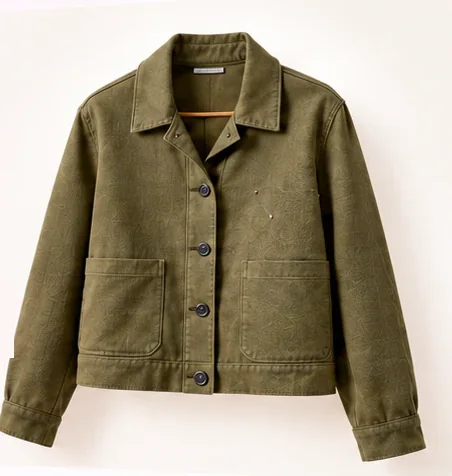
- Facts the seller gave
- jktolivecotton
- Title the seller wrote
- jkt olive
Category: ranked suggestions
- Fashion › Jackets, rank 1From the title word 'jkt' and the photo, which shows a jacket with buttons.
- Fashion › Coats, rank 2'jkt' can also stand for a coat; the photo shows a short garment.
- Fashion › Vests, rank 3The title names no sleeves; the photo shows a front opening.
In the order Youzu returns them.
Attributes for Jackets
| Field | Value | Where it came from |
|---|---|---|
| Product type | Jacket | Suggested from your category |
| Color | Olive | Suggested from your facts |
| Material | Cotton | Suggested from your facts |
| Closure | Buttons | Suggested from the photo |
| Fit | Left empty | Not visible in the photo. |
| Size | Left empty | Ask the seller. |
Title
Olive cotton jacket with buttons
You wrote: jkt olive
Description: alternatives
- Olive cotton jacket with a button closure.
- Button-up jacket in olive cotton.
- Olive jacket made of cotton, closed with buttons.
If the title read "Twin bed frame"
Sofa

- Facts the seller gave
- linen2000 mmHome / Misc
- Title the seller wrote
- linen sofa
Category: ranked suggestions
- Home › Living room › Sofas, rank 1From the word 'sofa', the width of 2000 mm and the photo.
- Home › Living room › Armchairs, rank 2A seat with arms; the width of 2000 mm is wide for one seat.
- Home › Living room › Benches, rank 3A long seat; the photo shows a back and arms.
In the order Youzu returns them.
Attributes for Sofas
| Field | Value | Where it came from |
|---|---|---|
| Product type | Sofa | Suggested from your category |
| Material | Linen | Suggested from your facts |
| Width | 2000 mm | Suggested from 2000 mm |
| Color | Cream | Suggested from the photo |
| Seats | Left empty | Not shown in the photo or the facts. |
Title
Linen sofa, 2000 mm wide
You wrote: linen sofa
Description: alternatives
- Linen sofa, 2000 mm wide.
- Cream linen sofa with a width of 2000 mm.
- A linen sofa in cream, 2000 mm wide.
Used chair
Facts only. Photos are optional for this sample.
- Facts the seller gave
- chairfor saleberlin
- Title the seller wrote
- chair for sale berlin
- Note the seller wrote
- small scuff on one arm
Category: ranked suggestions
- Furniture › Chairs, rank 1From the word 'chair' and the photo.
- Furniture › Stools, rank 2A seat without arms is a stool; this one has arms.
- Furniture › Benches, rank 3A bench seats more than one; the photo shows one seat.
In the order Youzu returns them.
Attributes for Chairs
| Field | Value | Where it came from |
|---|---|---|
| Material | Walnut | Suggested from the photo |
| Cushion | Cream | Suggested from the photo |
| Condition | Used | From the seller. Stays with the item. |
| Location | Berlin | From the seller's title. Stays with the item. |
| Note | Small scuff on the arm | From the seller's note. Stays with the item. |
| Width | Left empty | Ask the owner for the width. |
Title
Walnut chair with cream cushion. Used chair in Berlin with a small scuff on the arm.
You wrote: chair for sale berlin
Description: alternatives
- Walnut chair with a cream cushion. Used, with a small scuff on the arm. Pickup in Berlin.
- Used walnut chair, cream cushion, small scuff on one arm. Berlin.
- Walnut chair in used condition with a cream cushion and a small scuff on the arm.
Sketch
Put a seller listing flow in order
- 1.Photo
- 2.Name
- 3.Category
- 4.Attributes
- 5.Description
Same as the suggestionSuggested: Photo, Name, Category, Attributes, Description.
- Photo
- Ask for the photo first: it carries most of what a buyer needs to know, and the later steps can start from it.
- Name
- The seller's own short title. A suggestion can tidy it; the seller keeps or changes it.
- Category
- Ranked category suggestions from the photo and the title; the seller picks one.
- Attributes
- Suggested values for the fields that category defines, left empty where the photo and the facts cannot show them.
- Description
- Description drafts written from the facts above; the seller edits one or writes their own.
Merchant API calls are advisory: they do not create, update or publish products; your application decides what to apply and owns saving and publishing.
Read as text
Ranked category suggestions
Category is the decision that shapes everything after it, so suggest more than one. Show a short ranked list, each option with the reason it was suggested, and keep 'None of these' and a search of every category one click away. For 'jkt olive', the ranked list in the example is Fashion › Jackets, then Coats, then Vests, and the reason for the first is the title word 'jkt' and a photo of a jacket with buttons.
If the seller already chose a category, use it: a provided category should skip inference, and a provided parent such as Home should limit suggestions to its children. If no category can be settled, say so and stop there. Attribute and description suggestions that depend on an unresolved category are better skipped than guessed.
Category-specific attributes
Once the category is chosen, show only the attributes that category needs. A jacket asks for color, material, closure, fit and size; a sofa for material, width, color and seats; a used chair for material, condition, location and width. Each suggested value should say where it came from, such as 'Suggested from your facts' or 'Suggested from the photo', so the seller can judge it at a glance.
Fields the evidence does not support stay empty with a short reason: 'Not visible in the photo', 'Ask the seller', 'Ask the owner for the width'. An empty field with a reason invites the seller to fill it; a field filled with a guess invites them to skip it. This is attribute extraction (pulling structured values such as color, material or size out of text or images and storing them as fields on a product record) working in front of the seller instead of after submission.
A draft the seller edits
With a category and attributes in place, the flow can draft a title and a short description. Show the draft beside what the seller wrote, never instead of it: 'Olive cotton jacket with buttons' next to 'You wrote: jkt olive'. Offer a few description alternatives rather than one, and make keeping the original title a first-class choice.
For the sofa, the draft title reads 'Linen sofa, 2000 mm wide'. For the used chair, the draft keeps the facts that belong to that one item, condition, location and the note about the scuff, in a group labeled as staying with the item, so they never end up on a shared product record.
Mismatch warnings
Some listings contradict themselves: a title that names one product and a photo that shows another. The example includes a toggle that changes the jacket's title to 'Twin bed frame'. The useful warning names both fields, the title and the first photo, and asks the seller to check them before saving. It does not decide which one is wrong.
Policy check at submit
Run the category's policy rules when the seller submits, not only after publication. A watermark on the first photo or contact details in the description can be shown to the seller as a reason code with a fix while they are still in the flow. Listings that pass go live; listings with findings are held or returned with the reason. The classifieds listing moderation guide covers how those rules are written and tested.
Partial results need honest wording too. If attribute suggestions are only partly available, say 'Attributes: partial result. Some fields have no suggestion.' If descriptions fail, keep the seller's text and offer to let them write it. A flow that fails quietly teaches sellers that suggestions cannot be trusted.
Who decides: advisory suggestions
Every suggestion in this flow is advisory. The seller decides what to accept, and your platform decides what is saved and published. That split keeps responsibility clear, keeps the seller's original data available for review, and lets you change the suggestion source without changing your publishing rules.
| Part of the listing | The seller provides | The flow suggests | Who decides |
|---|---|---|---|
| Photo | One or more photos of the item | Image guidance and image checks | The seller |
| Category | Optional: a category or a parent such as Home | A ranked list with a reason for each | The seller, from the list or a search |
| Attributes | Facts a photo cannot show | Values with their source, or empty with a reason | The seller |
| Title and description | A short title of their own | A draft and alternatives beside the original | The seller |
| Policy | Nothing extra | Findings with reason codes at submit | Your platform's rules and reviewers |
The same split applies when suggestions come from an API. Merchant API calls are advisory: they do not create, update or publish products; your application decides what to apply and owns saving and publishing. The Merchant API v2 reference documents the requests and responses.[1]
What to track
Measure the flow on your own sellers and categories, and compare each measure with itself before and after a change:
- Listings started and listings submitted, per entry point.
- Category suggestions accepted at rank one, at a lower rank, or replaced by a search.
- Suggested attribute values kept, edited or cleared by the seller.
- Required fields left empty at submit, per category.
- Mismatch warnings shown, and how often the seller changed a field afterwards.
- Listings held or returned by the policy check, per reason code.
Youzu helps marketplaces, classifieds and retailers turn raw seller and supplier product data into structured, reviewable catalog records, and a listing flow is the earliest point where that data can be shaped.
Boundaries
What Youzu does not do
- Youzu does not publish listings for you. Merchant API calls are advisory: they do not create, update or publish products; your application decides what to apply and owns saving and publishing.
- Youzu publishes no accuracy figures. Measure accuracy on your own sample against your own labels, with critical errors reported separately.
- Youzu does not replace your ERP, search or storefront; those systems stay authoritative for their own data. It can replace your PIM, or work alongside it.
Checklist
Seller listing flow checklist
11 checks from the first photo to the policy check at submit, with the step each belongs to, an owner and a status column.
A CSV file of 11 rows, named youzu-seller-listing-flow-checklist.csv. No form to fill in first.
| Step | Check | Owner | Status |
|---|---|---|---|
| Photo | The flow starts with a photo and shows image guidance on the spot | Product design | |
| Minimum | Only facts a photo cannot show are required | Product design | |
| Category | Suggestions are ranked and each shows its reason | Catalog operations | |
| Category | 'None of these' and a full category search are always available | Product design | |
| Category | A provided category or parent limits or skips suggestions | Engineering | |
| Attributes | Only the chosen category's attributes are shown | Catalog operations | |
| Attributes | Each suggested value shows where it came from | Product design | |
| Attributes | Unsupported fields stay empty with a reason | Catalog operations | |
| Draft | The seller's original title is kept beside the draft | Product design | |
| Mismatch | Contradicting fields are named before saving | Product design | |
| Submit | Policy rules run at submit with reason codes shown | Trust and safety |
FAQ
Questions buyers ask
Short answers to the questions teams ask about this topic.
As few as the category allows. Ask for the photo and the facts a photo cannot show, such as material, measurements and condition, and suggest the rest. Required fields should come from the chosen category, so a jacket and a sofa ask for different things. Every extra required field is a reason for a seller to stop.
Suggestions can prefill fields, as long as the seller can see where each value came from and change it before saving. Keep the seller's original text beside any suggested title or description. Fields without evidence should stay empty with a reason, so the seller fills them instead of trusting a guess.
Usually not. A mismatch warning should name the fields that disagree and ask the seller to check them. Some mismatches are mistakes, others are a photo of the item in use or a title in another language. Let the seller correct or confirm, and let your policy rules decide what can be published.
Used items carry facts that belong to that one item: condition, location, defects and notes from the owner. Keep them in a group of their own so they are never copied onto a shared product record, and prompt for missing measurements with a clear question, such as asking the owner for the width.
The Merchant API offers 6 endpoints: identity (name, brand), category, attributes, descriptions, image checks (1 to 6 images) and an asset upload URL. Merchant API calls are advisory: they do not create, update or publish products; your application decides what to apply and owns saving and publishing.
Last reviewed
Sources
Merchant API v2 reference, Youzu documentation. docs.youzu.ai/docs/catalogue/merchant-api-v2. Accessed . Back
Website Forms Usability: Top 10 Recommendations, Nielsen Norman Group. nngroup.com/articles/web-form-design. Accessed . Back
Image link [image_link], Google Merchant Center Help. support.google.com/merchants/answer/6324350. Accessed . Back
About this guide
Published by Youzu · Editorial policy
- Published
Every guide defines its terms, works through one example and cites the public sources it relies on, with the date each source was checked.
Guides explain methods. They do not rank Youzu above other approaches, and an example is never presented as a customer result.
More in all guides and the catalog glossary.
Related
Keep reading
Product
Merchant: a seller listing assistant for your marketplace
Merchant API suggestions inside your own seller listing form: identity, category, attributes and descriptions from photos and facts, plus image checks.
Product
Automatic product categorization and taxonomy mapping
Map every product to your category tree: a category you supply skips inference, a parent limits the choice and unresolved categories are not guessed.
Product
Listing moderation for marketplaces and classifieds
Define moderation rules with severity, image scope and reference images, test them, preview their impact and review flagged products in a queue.