
Guide Shopper experiences
Virtual staging for furniture retailers and property teams.
Virtual staging digitally furnishes a room photo. Furniture retailers use it so shoppers can see products in context; property teams use it to show how an empty room could look. This Youzu guide covers how to evaluate realism, scale, SKU linking and disclosure, and how to label staged images clearly.
Published by Youzu · Editorial policy
- Published
- Reading time
- 8 min read
Key points
- Use virtual staging to show possibilities, never to change what a room or a product is.
- Check realism, scale cues, product linking and disclosure before an image is published.
- Place real catalog products when the goal is selling them, and link each one back.
- Keep a 'Virtually staged' label on the image itself, wherever it is shown or shared.
- Check disclosure rules for each market with counsel before publishing property images.
In this guide
What virtual staging is
Virtual staging edits a photo of a real room to add furniture and decor, instead of furnishing the room physically. The walls, windows, floor and view stay as photographed; the furniture is added digitally. The result is an illustration of how the room could look, not a photo of how it is.
3 related techniques are often grouped under the same name. Staging places items into a photo of an empty or sparsely furnished room. Restyling changes items that are already there, for example swapping one armchair for another. Scene generation builds a whole room from a description or a style. All 3 produce images that did not come from a camera in their final form, so all 3 need the same care over disclosure and review.
Because the room photo carries the real light, perspective and proportions, a well-staged image can look entirely natural. That is the point, and it is also the risk: a viewer cannot tell what was added unless you tell them.
Physical staging, placing rented furniture in an empty home before photographing it, is the older form of the same idea. The digital form makes the furniture easy to change, so one room photo can show several styles, colors or products without a new photo shoot for each.
Retail and property uses
The technique is the same; the goals and the rules differ.
| Aspect | Furniture and home retail | Property |
|---|---|---|
| Goal | Show real products in a believable room so shoppers can picture them at home | Show what an empty or dated room could become |
| What is placed | Products from the retailer's own catalog | Furniture and decor that may not be for sale at all |
| What must stay true | The product's look, color and proportions | The room's structure, fixtures, views and condition |
| Main risk | A product looks different from what arrives | A buyer or tenant is misled about the property |
| Where it appears | Product pages, inspiration pages, campaigns | Listings, portals, brochures |
For retailers, product imagery rules still apply to the product itself. Channels such as Google Merchant Center require the main product image to show the exact item being sold, clean and unobstructed, and keep lifestyle images in a separate field.[2] A staged room belongs with lifestyle imagery, not in place of the product photo.
Retailers also use staging inside the shopping journey, letting shoppers place selected products into a room photo. The same evaluation applies, with one addition: the shopper must be able to get from any item in the image to its product page, and back again.
Property teams face a different first question: which rooms to stage at all. Empty rooms, awkward layouts and dated interiors gain the most; a well-furnished room usually needs only good light. Staging every room of a listing makes the set feel artificial and raises questions buyers will ask at the viewing.
Evaluating realism, scale and SKU linking
Evaluate staging on your own rooms and your own products, image by image, against the original photo. The worked example below places 3 selected products, a cream sofa, a wood coffee table and a magenta accent chair, into a photo of a bright empty room. Drag the divider to compare the original with the staged image, and select a product to see where it was placed.
Worked example
3 products staged in an empty room
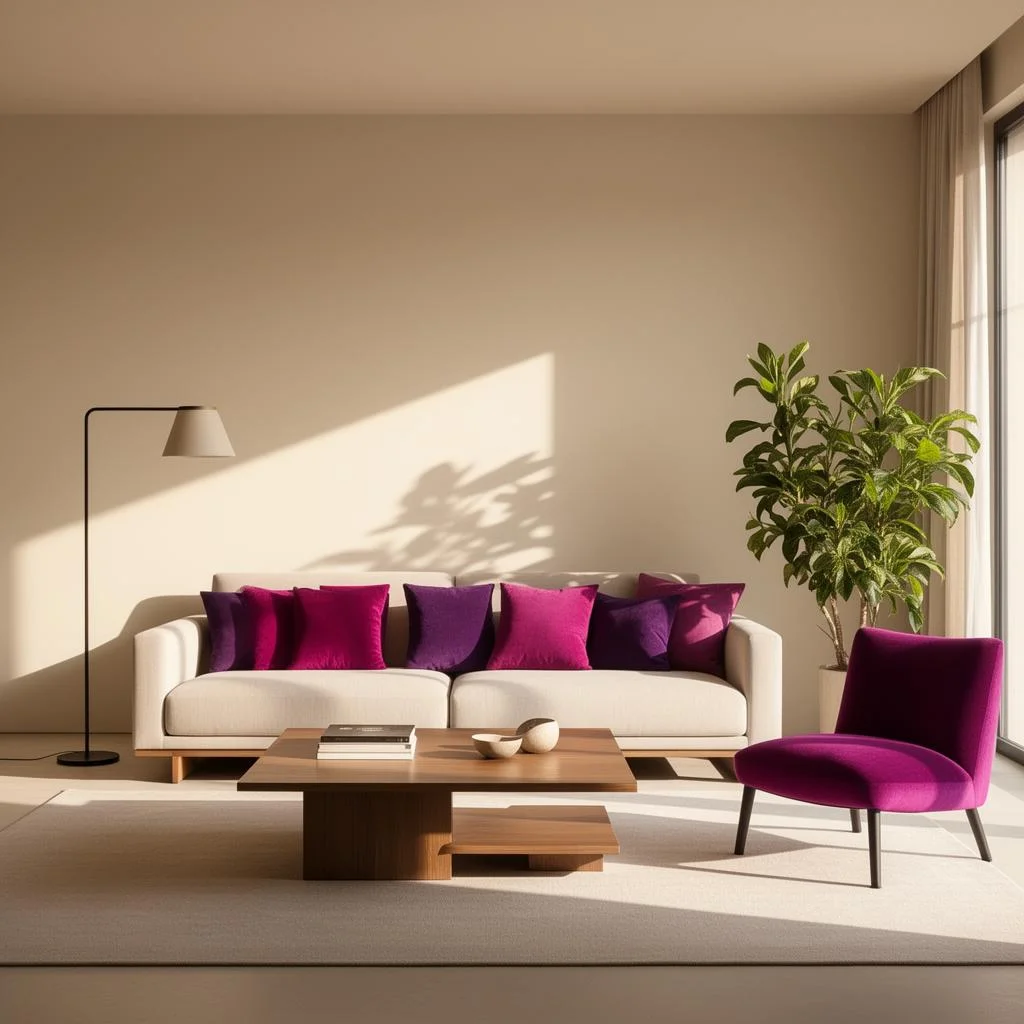 Virtually staged

Drag the handle or use the arrow keys.
Products you selected
4 questions cover most of what can go wrong:
- Realism. Do light direction, shadows, reflections and perspective match the room? A sofa lit from the left in a room lit from the right looks pasted in, even when the viewer cannot say why.
- Scale cues. Do items look plausibly sized next to doors, windows, skirting boards and each other? Staged images are illustrations, not measurements, so judge scale by eye only.
- Product linking. For retail staging, can every placed item be traced to a real product in the catalog, with the right color and variant? An image that sells a sofa you do not stock creates support work.
- Structure. Are the walls, windows, floor and fixtures unchanged? Check every staged image against the original photo, because generated results can differ.
Review a sample of staged images with the people who handle returns and complaints, not only with the marketing team. They know which differences between an image and the delivered product cause problems, and their list is usually short and specific: color shifts, missing legs or handles, and items that look larger or smaller than they are.
Decide in advance who signs off a staged image and what they compare it with. A short written routine, the original photo beside the staged one and the checklist below in hand, catches more problems than a general instruction to be careful.
Disclosing staged images
A staged image needs a label that travels with it. General advertising guidance asks for disclosures that are clear and placed where viewers will see them, close to the claim they qualify, rather than tucked away in small print or behind a link.[1] For a staged photo, the claim is the image itself, so the label belongs on or directly next to the image.
- Put a short label such as 'Virtually staged' on the image, not only in the description.
- Keep the label when the image is cropped, resized or shared to another channel.
- Keep an unstaged photo of the same room available where your market or platform expects one.
- Use the same wording everywhere, so viewers learn what it means.
- Start the image's alt text with the same words, so people using screen readers get the disclosure too.
Disclosure protects the product as well as the viewer. A shopper who knows an image is staged reads it as inspiration and checks the product page for details; a shopper who believes it is a photo expects the room and the product to look exactly like that when they arrive.
Property listings are where rules are strictest and differ most. Listing platforms and regional regulators set their own requirements for altered images, and they change. Check the rules for each market with counsel before publishing, and treat this guide as a starting point rather than legal advice.
From the same catalog, shoppers can search with a photo, shop the products in a scene, see products in a room photo, and see products on new backgrounds or in 3D. Room scenes are visual inspiration, not a fit check.
Boundaries
What Youzu does not do
- Youzu room images do not show whether a product fits a room. Room scenes are visual inspiration, not a fit check.
- Youzu does not guarantee that a staged room keeps its structure. Results can differ, so review every image against the original photo.
- Youzu publishes no accuracy figures. Measure accuracy on your own sample against your own labels, with critical errors reported separately.
Checklist
Staged image review checklist
12 checks to run on every staged image before publishing, grouped by realism, scale, product linking, structure and disclosure, with the room and product example from this guide in the first rows of the notes.
A CSV file of 12 rows, named youzu-virtual-staging-review-checklist.csv. No form to fill in first.
| Area | Check | Applies to | Result | Notes |
|---|---|---|---|---|
| Realism | Light direction and shadows match the room | Retail and property | Cream sofa against the window light | |
| Realism | Perspective of each item matches the floor and walls | Retail and property | Wood coffee table on the rug | |
| Scale | Items look plausibly sized next to doors and windows | Retail and property | Visual check only, not a measurement | |
| Scale | Items look plausibly sized next to each other | Retail and property | Magenta accent chair beside the sofa | |
| Product linking | Every placed item links to a real catalog product | Retail | ||
| Product linking | Color and variant shown match the linked product | Retail | ||
| Product linking | The main product image is still the plain product photo | Retail | ||
| Structure | Walls, windows, floor and fixtures are unchanged | Retail and property | Compare with the original photo | |
| Structure | No defects or features were hidden or added | Property | ||
| Disclosure | 'Virtually staged' label is on or next to the image | Retail and property | ||
| Disclosure | The label survives crops and resizing | Retail and property | ||
| Disclosure | Market rules were checked with counsel | Property |
FAQ
Questions buyers ask
Short answers to the questions teams ask about this topic.
Label them every time, and expect many listing platforms and markets to require it. Put the label on or directly next to the image, not only in the description, keep it when the image is cropped or shared, and keep an unstaged photo available where the rules ask for one. Check local requirements with counsel.
Not quite. Virtual staging edits a photo of a real room. A 3D render builds the whole scene from models. Renders give more control over angles and lighting; staging keeps the real room's light, structure and view, which is usually what a buyer of a property or a sofa wants to judge.
No. A staged image is an illustration, not a measurement. Room scenes are visual inspiration, not a fit check. To check fit, compare the product's listed dimensions with measurements of the room, and keep product pages as the source of size information whenever a staged image is shown beside them.
Yes, when the goal is selling those products. Staging with your own catalog lets each placed item link back to a product page, with the right color and variant. Generic furniture can make a room look good but sends shoppers looking for items you do not sell, which adds support work rather than sales.
Run it on your own room photos and your own products, and review every result against the original photo for realism, scale cues, structure and product linking. Count how many images a reviewer would publish without edits, and note every case where the room itself changed. Include difficult rooms on purpose, such as dark corners and wide angles.
Last reviewed
Sources
.com Disclosures: How to Make Effective Disclosures in Digital Advertising, U.S. Federal Trade Commission. ftc.gov/business-guidance/resources/com-disclosures-how-make-effective-disclosures-digital-advertising. Accessed . Back
Image link [image_link], Google Merchant Center Help. support.google.com/merchants/answer/6324350. Accessed . Back
About this guide
Published by Youzu · Editorial policy
- Published
Every guide defines its terms, works through one example and cites the public sources it relies on, with the date each source was checked.
Guides explain methods. They do not rank Youzu above other approaches, and an example is never presented as a customer result.
More in all guides and the catalog glossary.
Related
Keep reading
Product
Room scenes from your catalog are made in Room Visualizer
Room scenes built only from the products you sell are made in Room Visualizer, in a room type and style you choose, with 2 to 6 of your products.
Product
Visualize: show products in context
Visualize shows products in context: Room Visualizer scenes and Youzu Swap to replace an item in a room photo.
Industry
Virtual staging for real estate photos
Create virtually staged views from property photos: clean a room, restyle it or swap one item, with staged images labeled as virtually staged. Book a demo.