
How to replace one chair in a shoppable room photo
Compare furniture alternatives in the same room. Check the replacement against the catalog photo and make sure the hotspot opens the right product.
Published by Youzu · Editorial policy
- Published
- Updated
- Reading time
- 2 min read
What changed: Revised article and supporting media
In this article
Use Youzu Swap when the room is right but one item needs to change. Select the item in the room photo, choose a replacement from your catalog, then compare the result with the original. Before putting it in front of shoppers, verify two things separately: the image shows the alternative you intended, and its link opens that alternative’s product page.
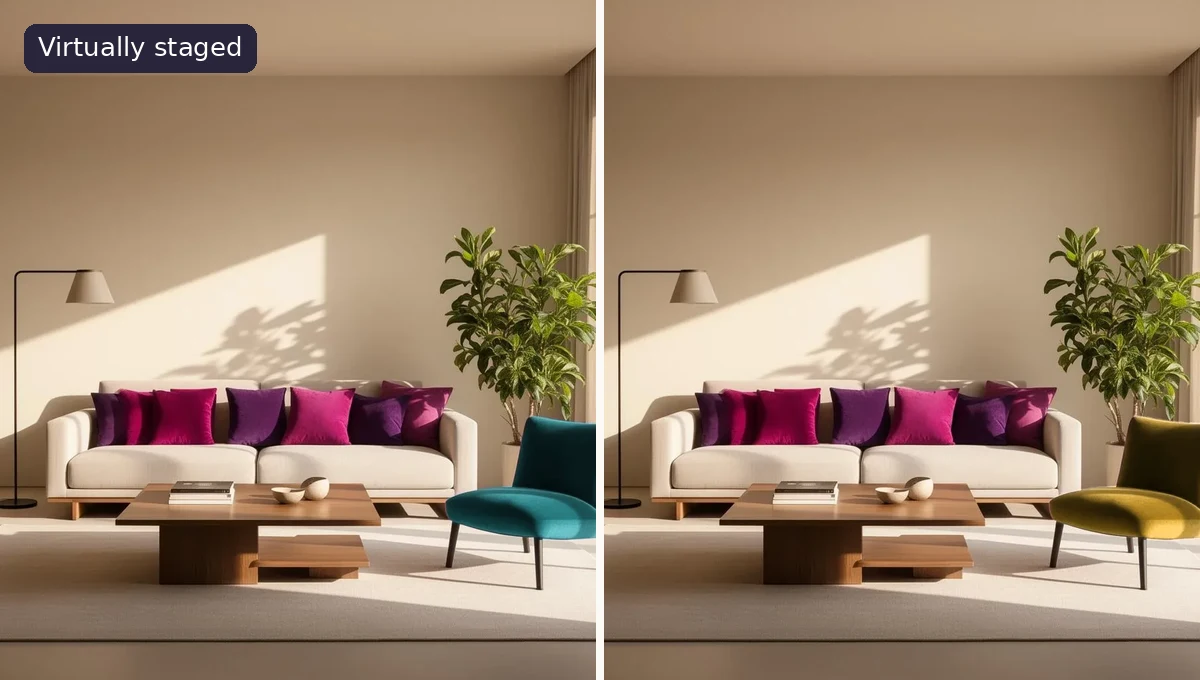
Change the chair, not the buying promise
In the public example, the room contains a magenta accent chair. Select it and try the teal armchair instead. The point of keeping the room is to make the choice easier to see: the chair is judged against the same sofa and wall, rather than against a second studio backdrop. It is still a generated image. The two views can differ outside the selected chair.
A typical merchandising use is a campaign photo with a chair you can no longer offer. Pick a replacement your storefront can sell in the shopper’s market. Don’t relabel the original chair as available or imply that the alternative is an exact match. Call it an alternative and let the shopper open the replacement’s details.
Check the image and the destination separately
| Look at | Send it back if… |
|---|---|
| The chair against its catalog photo | The back, legs, arms or upholstery no longer identify the selected piece. |
| The rest of the room | A change to a nearby item, shadow or doorway misrepresents what the shopper is comparing. |
| The hotspot | It opens the original chair, another finish or a generic collection rather than the intended item. |
| The storefront page | The linked variant cannot be bought on the terms the campaign copy promises. |
Start with a clean catalog photo showing the whole piece. Keep the original room image for the reviewer; without it, an unexplained change to a rug or side table is surprisingly easy to miss. Label the generated view “Virtually staged.” For size and clearance, send the shopper to the dimensions. A convincing perspective is not a measurement.
When replacing one item is the wrong job
If the brief is to build a living room around several pieces, look at the Room Visualizer example. If the shopper just needs other chairs to browse, use visually similar product recommendations and leave the room photo alone. Swap is useful when seeing the alternative in this particular room changes the decision.
Read the captions
Magenta accent chair in a virtually staged living room. A teal alternative appears beside its catalog photo. A mustard alternative appears in the same setting.