
Large online retailers
Clean product data across a large assortment.
Youzu maps supplier products to your category tree and extracts the attributes your category defines, keeping numbers typed. Large online retailers receive supplier files in many formats with thin data; Youzu works alongside your PIM, ERP and storefront, keeps variants and offers organized and leaves unsupported fields empty for a reviewer.
Supplier files arrive in many shapes. Youzu prepares the records around your PIM, ERP and storefront and leaves what it cannot support empty for a person to review.
Problems
3 problems you may recognize
The record says "box 3pc grey" and nothing else.
A supplier row has a cryptic name, no category, no usable description and one photo. Your team re-keys it before it can enter the PIM.
Every supplier sends a different file.
Column names, formats and levels of detail change by supplier, so each new range starts with another mapping exercise against your category tree.
The details you must have are the ones missing.
Hazard labels, compatibility facts or allergens are not in the file or on the photo. A guess is worse than a gap, so the field needs a source and a reviewer.
How it works
From supplier file to reviewed record.
Suppliers send many formats. Youzu prepares one reviewable record per product around the systems you already run.
Step 1 of 4: Bring in the supplier files
Bring in the supplier files
Send CSV, JSON or XML, call the API or upload in the dashboard. Changed records can be re-sent at any time.
- Supplier files, ERP export
- Youzu: prepare, reviewthen API or file handoff
- Your PIM, storefront, search
Step 2 of 4: Map and fill
Map and fill
Your category tree decides which attributes each product needs. Numbers and yes/no values stay typed; unsupported fields stay empty.
Step 3 of 4: Flag duplicates across suppliers
Flag duplicates across suppliers
Matching is precision-first: pairs that cannot be shown to be the same product stay separate, and uncertain cases can go to review.
Step 4 of 4: Review the exceptions
Review the exceptions
Reviewers approve or reject enrichment before it is accepted. Processed records can be read back through the API.
Source changes. Updated products.
The supplier row as received
SUP-10042; box 3pc grey 40x30; size column: 60x40x30 cm; 1 photoStep 4 of 4: finished record
- Title
- Storage boxes with lids, set of 3, grey
- Title, German
- Aufbewahrungsboxen mit Deckel, 3er-Set, grau
- Category
- Home › Storage › Storage boxes
- Size
- Left empty 2 sources disagree; a reviewer chooses
Enrichment can be reviewed before it is accepted.
Read as text
Start with
Start with 3 capabilities
Product enrichment
Fill the attributes your categories define
Fill category attributes from supplier text and images; leave the rest empty.
Automatic categorization
Map products to your category tree
Map every product to your category tree.
Review and governance
Review queue and approvals
Approve or reject enrichment before it is accepted.
Follow one supplier record.
Try it: review the flagged size.
Original information
A sparse supplier row
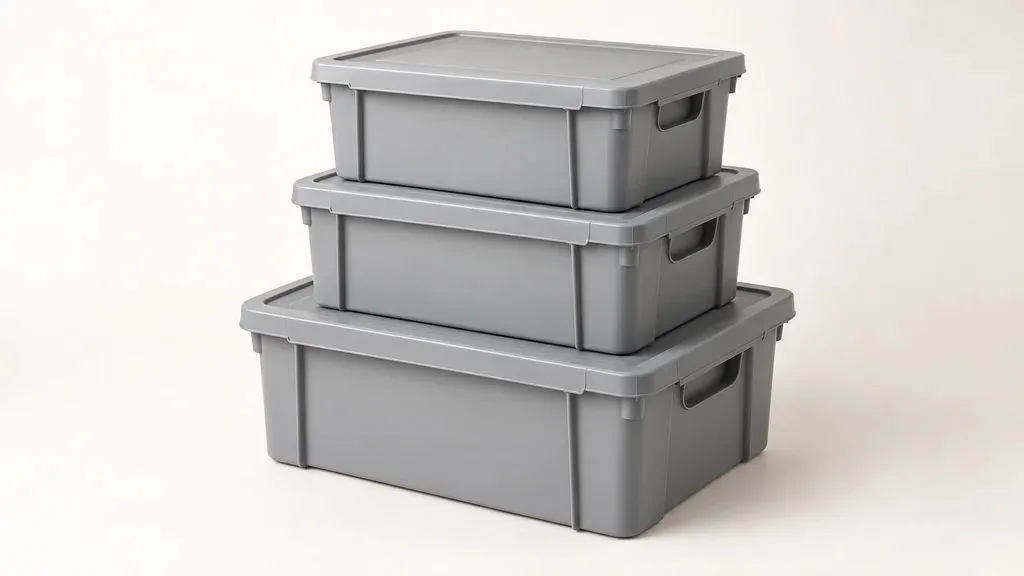
As supplied
- SKU
- SUP-10042
- Name
- box 3pc grey 40x30
- Category
- Empty
- Description
- Empty
- Size column
- 60x40x30 cm
- Photo
- 1
Suggested details
Typed fields, gaps left empty
- Category
- Home › Storage › Storage boxesSuggested, from your tree
- Title
- Storage boxes with lids, set of 3, greySuggested
- Material
- PlasticFrom the photo
- Color
- GreyFrom the name
- Pieces
- 3From the name
- Lid included
- YesFrom the photo
- Stackable
- Left emptyNot in the file or the photo
- Capacity (L)
- Left emptyNot in the file or the photo
- Size
- Needs reviewField not filled. 2 sources disagree.
- Size column: 60x40x30 cm
- Name: 40x30
Your review
Your catalog
The record you read back
- Category
- Home › Storage › Storage boxes
- Title
- Storage boxes with lids, set of 3, grey
- Material
- Plastic
- Color
- Grey
- Pieces
- 3
- Lid included
- Yes
- Stackable
- Left emptyNot in the file or the photo
- Capacity (L)
- Left emptyNot in the file or the photo
- Size
- Needs review
Read back through the API or a file. Your PIM stays the system of record.

FAQ
Questions from large retail teams
Youzu can replace your PIM, not your ERP. Products, variants and seller offers live in Youzu as structured, reviewable records, so you can run your catalog there instead of in a separate PIM, or keep your PIM and run Youzu alongside it. Your ERP, search and storefront stay authoritative for their own data, and processed records can be read back through the API. You do not need a pre-built connector: you send files or call the API.
Yes. Your category tree defines the attributes each category needs, and Youzu extracts those from text and images. Numbers and yes/no values stay typed, and values the evidence does not support are left empty. A storage box, a wall cabinet and a multipack therefore carry different fields, as the example on this page shows.
You do not need a pre-built connector: send files or call the API. Products arrive as JSON, a hosted CSV, JSON or XML file, or a dashboard upload, and processed records can be read back through the API with filters. Delivery to a destination such as your PIM is scoped per integration rather than assumed.
Youzu fills an attribute only when your data or the product images support it, and leaves it empty for review when they do not. It does not certify regulatory compliance. Compliance-critical fields, such as allergens or alcohol content, need an authoritative source and a named reviewer. Fields left empty go to review, so your team can see what is missing.
Youzu does not fill a field with a guess when the evidence does not support one value, and enrichment can be reviewed before it is accepted. In the example on this page, a size in the name and a size column disagree, so the field is flagged and a reviewer decides. Reviewers can approve or reject enrichment before it is accepted.
Bring a sample across 2 categories, your required fields and one destination format. Evaluations start with a sample of your own catalog and expand to more workflows once the results are reviewed. You measure accuracy on your own sample, against your own labels, with critical errors reported separately.
Next step
Bring a sample across 2 categories, your required fields and one destination format.
Include thin records, conflicting values and the system the data has to reach.