
Catalog Intelligence

Merchant: a seller listing assistant for your marketplace.

Merchant is Youzu's seller listing assistant, delivered through the Merchant API. Inside your own listing form it suggests a category, attributes and descriptions from a seller's photos and facts, warns when title, brand and image seem to contradict each other, and checks images. Your application decides what to apply and owns saving and publishing.

Merchant, Youzu's seller listing assistant, returns suggestions; your system saves and publishes. It is part of Catalog Intelligence.
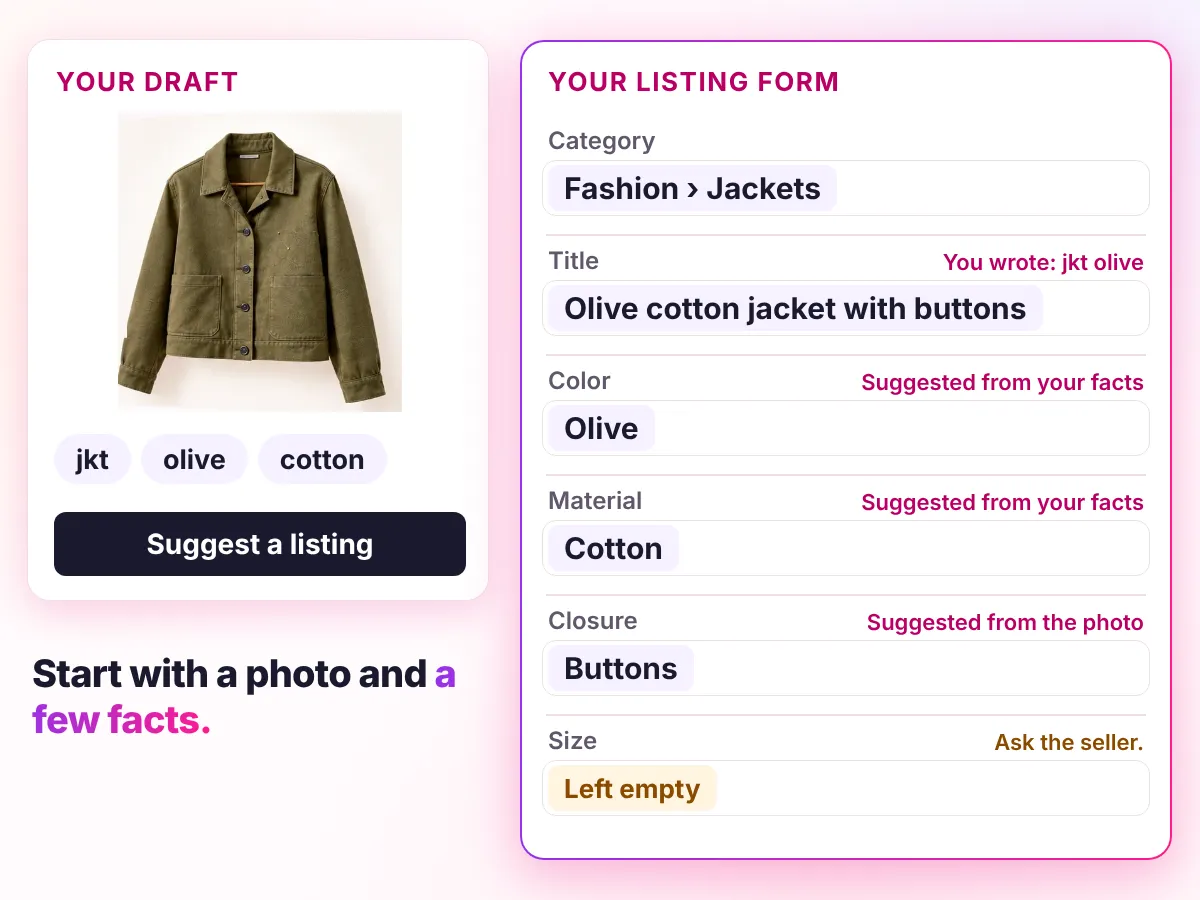
A seller's jacket photo and the facts jkt, olive and cotton become suggestions in their own listing form: category, title, color, material and closure, with size left empty for the seller

Key points

  • Use a seller's photos and facts to suggest a category, attributes and descriptions.
  • Fill the attributes the chosen category defines, and keep the text the seller supplied.
  • Flag a title, brand and image that seem to contradict each other; check images.
  • Keep your application in charge: suggestions are advisory, and it saves and publishes.

Try it

Start with a photo and a few facts.

Start with a photo and a few facts. Review the suggested listing.

  1. Your draft
  2. Suggestions
  3. Listing preview

Your draft

Used chair

Facts only. Photos are optional for this sample.

Facts the seller gave

  • chair
  • for sale
  • berlin

Title the seller wrote

chair for sale berlin

Note the seller wrote

small scuff on one arm

Suggestions

chair for sale berlin

Suggestions appear here after you press Suggest a listing.

Listing preview

Used chair

Facts only. Photos are optional for this sample.

chair for sale berlin

Category not set

No description yet.

The listing builds here as you decide.

Your system saves and publishes. Youzu returns suggestions.

Try another result

Read as text

Your draft

Facts only. Photos are optional for this sample. Facts the seller gave: chair, for sale, berlin. Title the seller wrote: chair for sale berlin.

Suggestions
FieldYour draftSuggestions
Titlechair for sale berlinWalnut chair with cream cushion. Used chair in Berlin with a small scuff on the arm.
CategoryEmptyFurniture › Chairs. From the word 'chair' and the photo.
MaterialEmptyWalnut. Suggested from the photo
CushionEmptyCream. Suggested from the photo
ConditionUsedUsed. From the seller
LocationBerlinBerlin. From the seller's title
NoteSmall scuff on the armSmall scuff on the arm. From the seller's note
WidthEmptyEmpty. Ask the owner for the width.
DescriptionEmptyWalnut chair with a cream cushion. Used, with a small scuff on the arm. Pickup in Berlin.

Listing preview

Walnut chair with cream cushion. Used chair in Berlin with a small scuff on the arm.. Furniture › Chairs. Material: Walnut, Cushion: Cream, Condition: Used, Location: Berlin, Note: Small scuff on the arm, Width: Empty. Walnut chair with a cream cushion. Used, with a small scuff on the arm. Pickup in Berlin.

Preview only. Nothing was saved.

Your system saves and publishes. Youzu returns suggestions.

See it with your products

Image checks

Check the photos.

Choose a photo by its thumbnail or by name. Both show the same finding.

Choose a photo to see what the image check found.
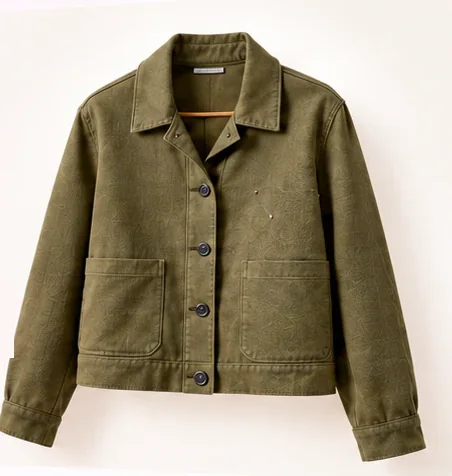
Photo 1: An olive cotton jacket with a front button closure and 2 front pockets on a plain light background.
Photo 1
Photos in this listing

Finding for Photo 1

Check completed

No findings for this policy.

Policy: Image must show the product itself; no watermarks.

Findings carry a severity of info, warning or error. A request checks 1 to 6 images.

A completed check is not a pass verdict. Your application decides whether to warn, ask for a replacement or hold the listing.

Read as text

A listing has 2 photos. The image check runs the policy "Image must show the product itself; no watermarks".

  • Photo 1: Check completed. No findings for this policy.
  • Photo 2: Check completed, severity Warning. Watermark in the lower right corner.

A completed check is not a pass verdict. Your application decides whether to warn, ask for a replacement or hold the listing.

See it with your products

Decisions

How a decision is made

Inputs
A seller's photos and facts, an optional category or parent category, and your catalog context.
Signals
Photos, facts and your category definitions. A category you provide skips inference; a parent limits the choice to its descendants.
Review
Suggestions are advisory. An unresolved category means attribute and description suggestions are skipped rather than guessed.
Output
Suggestions only: Merchant calls do not create, update or publish products. Your application decides what to apply and owns saving and publishing.
Original record
Youzu keeps any text the seller supplied and returns suggestions beside it; your application records what is saved.

Your rules, your reviewers, your approval.

In production. Birmarket, Azerbaijan's largest marketplace, runs Youzu Catalog Intelligence and the Merchant API.

The example's first state: what the seller gave and what Youzu suggests for the jacket sample.

The example's first state: what the seller gave and what Youzu suggests for the jacket sample.
FieldYour draftSuggestions
Titlejkt oliveOlive cotton jacket with buttons
CategoryEmptyFashion › Jackets. Why: From the title word 'jkt' and the photo, which shows a jacket with buttons.
Product typeEmptyJacket. Suggested from your category
ColoroliveOlive. Suggested from your facts
MaterialcottonCotton. Suggested from your facts
ClosureEmptyButtons. Suggested from the photo
FitEmptyLeft empty: Not visible in the photo.
SizeEmptyLeft empty: Ask the seller.
DescriptionEmpty3 suggestions to choose from

Help sellers prepare better listings

Help sellers prepare better listings

The listing form stands for your own system.

Transcript
  1. Help sellers prepare better listings. (Visual: Under a Seller listing assistant eyebrow, a plain listing form opens with a large photo of an olive jacket and a Your draft chip.)
  2. Start with a photo and a few facts. (Visual: Under the Your draft chip, 3 short facts sit as chips, jkt, olive and cotton; a ring marks the photo, then each fact chip in turn, and the form tidies into a compact row.)
  3. Get suggested categories, in order. In the order Youzu returns them. (Visual: A Suggestions card lists Fashion > Jackets, Fashion > Coats and Fashion > Vests from top to bottom, with no scores or rank labels; the details area reads Needs more information until a ribbon runs from the photo to the first row and Fashion > Jackets is selected.)
  4. Fill the details that category needs. (Visual: The fields that category needs fill one at a time, Color: Olive, Material: Cotton and Closure: Buttons, and the matching fact chip is ringed; while Closure fills, the photo is ringed and the cue reads From the photo.)
  5. Review and edit the draft. (Visual: The card becomes a Listing preview with the editable title Olive cotton jacket with buttons and 2 actions, Use suggestion and Edit.)
  6. Your system saves and publishes. Youzu returns suggestions. (Visual: A person presses Use suggestion and the suggested title becomes the draft title; the closing lines say who does what.)
  7. See it with your catalog. Book a demo. (Visual: End card: a white card with a short gradient rule, the line, a Book a demo button and the Youzu logo.)
Watch the 18-second demo

Read the Merchant API reference

Documentation

For developers

Send the request from your server and keep the key there. Pass the category when you know it so inference is skipped.

Questions buyers ask

Merchant is Youzu's seller listing assistant, delivered through the Merchant API. Inside your own listing form it can suggest a category, attributes and descriptions from a seller's photos and facts, warn when title, brand and image seem to contradict each other, and check images. Your application decides what to apply. Try the example above.

No. Merchant calls are advisory: they do not create, update or publish products. Your application decides what to apply and owns the draft, the catalog write and publication. Suggestions stay suggestions until your application applies them. Read the Merchant API reference for the calls.

No. The Merchant API has 6 endpoints: identity, category, attributes, descriptions, image checks and an asset upload URL. Use the ones your flow needs. If you already know the category, pass it in and inference is skipped. Access depends on your plan, a ready catalog and a monthly request quota. Ask Youzu about your plan.

Speed depends on the product and its images, and Youzu does not publish a response-time figure. Merchant API calls are advisory: your application decides what to show while it waits, what to apply, and what to do when a suggestion is late or incomplete. We test latency on your listing flow before you commit.

Any model can be wrong, so Youzu is built to leave a field empty rather than guess. Attributes follow your category schema, numbers and yes/no values stay typed, and when the text or images do not support a value, the field stays empty and goes to review. Your reviewers approve what is applied.

You can, and a prototype comes quickly. The cost is in production: matching one product across sellers, grouping variants, keeping offers apart, checking policies, routing unclear cases to review and handling failures, then maintaining all of it as models, your category tree and your rules change. Youzu already runs that workflow, and the same records power photo search, room visualization and 3D. Your engineers stay on your own product. We test on a sample of your catalog, against your own labels, so you can compare it with your own build.

Next step

See it with your products.

Show us the listing your sellers complete today.