
From a room photo to a chair you can actually shop
Follow a shopper from a saved room photo to a catalog alternative, a room preview, and the product details that still need checking before checkout.
Published by Youzu · Editorial policy
- Published
- Updated
- Reading time
- 3 min read
What changed: Revised article and supporting media
In this article
A shopper can start with the chair in a saved room photo instead of having to name its style. Youzu’s visual shopping tools help them find candidates in a retailer’s catalog, picture a selected item in a room, and inspect its shape. The product page is where they should confirm which chair they’re buying and on what terms.
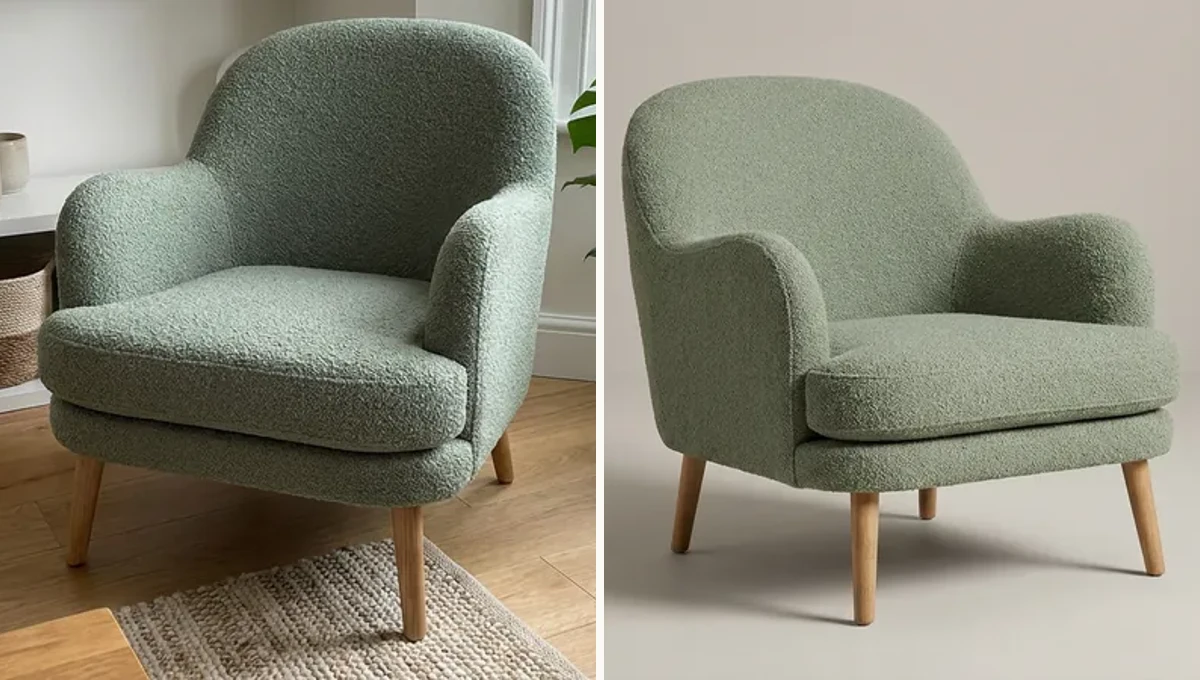
“I like the chair, not the whole room”
Imagine the photo shows a curved green chair, a floor lamp, and a patterned rug. The shopper wants the chair. Youzu Lens lets them search the assortment from a photo; Shop the Look lets them pick individual pieces in a scene. A close result might have the same low, rounded back but straight wooden legs instead of a swivel base. Label it as an alternative and link to its product page. The photographed chair’s features don’t carry over just because the silhouettes are alike.
The Shop the Look example makes that distinction visible with an outfit: the tan tote has an exact match, the trench coat has a similar match, and the denim shirt has none in the example assortment. Leaving one piece unlinked still lets the shopper explore the others.
“How would that one look by my window?”
Once the shopper has chosen a chair, the question changes. The Room Visualizer example shows a scene built around catalog products. Youzu Swap is the narrower choice when someone already has a room photo and wants to replace one piece. Compare the candidate with the original in that same spot. It’s a way to consider the color and shape beside the rug, not to measure the gap between the chair and the wall. For clearance, use the measurements of the room and the actual chair.
What a shopper can inspect on the product page
A clean background makes it easier to inspect the legs that the rug obscured. For a different view, Youzu’s 2D to 3D viewer builds a rotatable model from product photos. Hidden sides are inferred. If the distinction between a swivel and a fixed base matters, show a photograph of the base or the manufacturer’s specification rather than asking the shopper to infer it from the model.
Before making the image shoppable, click through as a buyer. Does the selected chair open in green? Does the page give the price and availability for that finish? If it’s sold out, give any substitute its own name and link. The shopper should know when they’ve found the chair they saw and when they’ve found another one they might like.
Read the captions
Shop the Look Shop the whole look. Find each item in the photo. Match each one to your products. Open the product from the look. See it with your catalog. Book a demo